


Ramzan is a time when many families look for quick financial support. The Punjab government introduced different digital initiatives so deserving households can receive help without long procedures. One important question people ask is: How to check ration card money through the Maryam Ko Batain app?
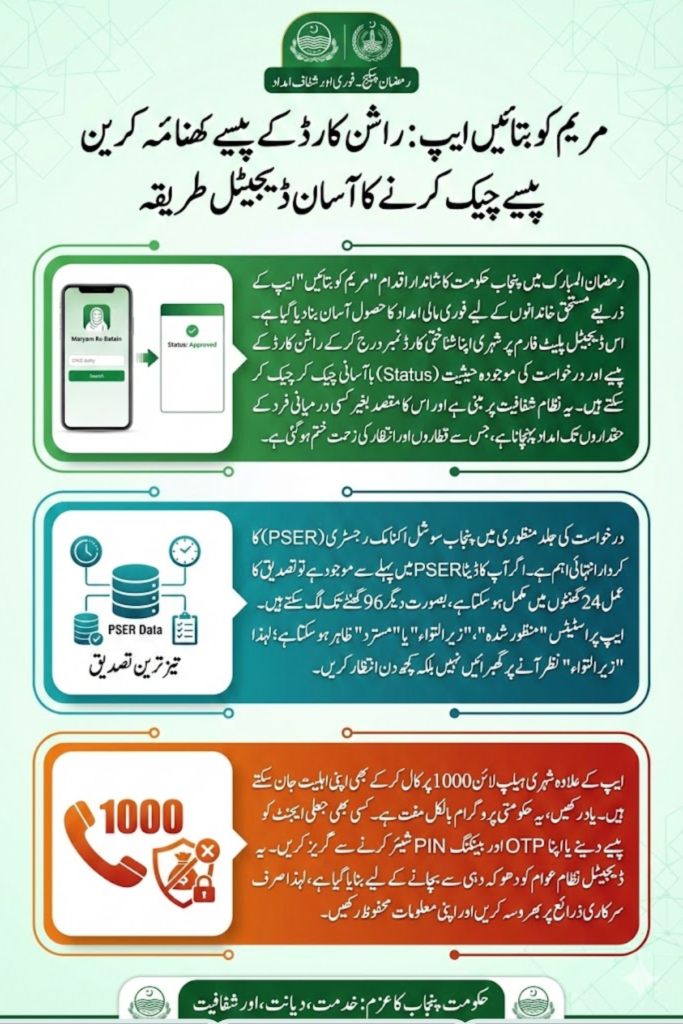
This complete guide explains the step-by-step method to check ration card payment, understand the role of PSER, use helpline 1000, and solve common issues. Everything is written in simple English so anyone can follow it easily.
You can also read: Maryam Ko Batain Web Portal 2026 Check Helplin
What Is Maryam Ko Batain Program?
Maryam Ko Batain is a Punjab initiative launched to provide immediate financial assistance during Ramzan. The main focus of the program is speed and transparency. Eligible families can receive up to Rs 10,000 after digital verification.
The system is fully digital. This means:
- Applications are verified through CNIC records
- Household data is checked digitally
- Status tracking is available
- Payments are processed without middle agents
The government designed the process to reduce delays and prevent fraud. If your data is already verified in PSER, your payment can move faster.
What Is the Maryam Ko Batain App?
The Maryam Ko Batain App and web portal allow applicants to:
- Apply using CNIC
- Check ration card payment status
- Track verification progress
- Update household details
The app is helpful for people who have internet access and want to avoid waiting on phone lines. It works alongside the official helpline 1000, giving users two safe ways to apply or check payment.
Ration Card k Paisy Check Karne Ka Tarika (Step-by-Step Guide)
If you want to check your ration card money through the Maryam Ko Batain App, follow these steps carefully:
Step 1: Open the Official App or Portal
Visit the official Maryam Ko Batain web portal or open the mobile app on your phone. Make sure you are using the official platform and not any third-party website.
Step 2: Enter Your CNIC Number
Type your 13-digit CNIC number without dashes. This is required for identity verification.
Step 3: Submit and Verify
After entering CNIC:
- Click on the submit button
- Wait for the system to fetch your record
- Complete any OTP verification if required
Step 4: Check Your Payment Status
Once verified, the system will show your application or ration card payment status.
You may see:
- Approved
- Under Verification
- Rejected
- Incomplete Information
Understanding Application Status
After checking your ration card money, you must understand what the status means. The table below explains each status clearly.
| Status | Meaning | What You Should Do |
|---|---|---|
| Approved | You are eligible and selected | Wait for payment instructions |
| Under Verification | Your data is being checked | Wait 24–96 hours |
| Rejected | Not eligible in this phase | Update details and recheck later |
| Incomplete | Data mismatch or missing info | Correct CNIC or household data |
If your status shows “Under Verification,” do not panic. New applicants may take up to 4 days for verification.
Role of PSER in Ration Card Payment
PSER (Punjab Socio-Economic Registry) plays a very important role in this process. It is the database used to identify deserving families.
If you are already registered in PSER:
- Your verification can be completed within 24 hours
- Your chances of faster approval increase
- Household data is already available in the system
If you are not registered, your details may take longer to verify. That is why updating your PSER record is important.
You can also read: Shahbaz Sharif Ramzan Package Registration
Applying Through Helpline 1000
If you cannot use the app, you can apply or check status through helpline 1000.
Follow this process:
- Call 1000 from your registered mobile number
- Provide CNIC details
- Follow operator instructions
- Keep your phone active for updates
Avoid calling repeatedly within minutes. If lines are busy, try again later.
Who Is Eligible for Ration Card Payment?
Eligibility depends on financial hardship and verification. The program mainly supports low-income families during Ramzan.
Common eligibility signals include:
- Low household income
- Financial hardship
- Verified PSER registration
- Correct CNIC and family information
Eligibility may vary depending on government phase and budget allocation.
Required Information Before Checking Payment
Keep these details ready before using the app or helpline:
- 13-digit CNIC
- Active mobile number
- Correct household details
- PSER registration (if available)
Incorrect or mismatched information can delay your payment.
Common Problems and Solutions
Many people face small issues during the process. Here are quick solutions.
Call Not Connecting
- Try at less busy hours
- Wait and call again
- Ensure your SIM is active
Status Not Updating
- Wait at least 24 hours
- Check again after 3–4 days
- Make sure CNIC is correct
Someone Asking for Money
This is a scam.
- Do not pay any agent
- Do not share OTP or PIN
- Use only official helpline and portal
The program does not require agent fees.
Safety Guidelines for Applicants
To protect yourself from fraud:
- Never share OTP codes
- Do not share JazzCash or Easypaisa PIN
- Avoid unofficial WhatsApp groups
- Use only government-announced channels
Digital systems are designed to eliminate middlemen.
You can also read: Wazir-E-Azam Ramzan Package Registration
Conclusion
Checking ration card money through the Maryam Ko Batain App is simple if you follow the correct steps. Use your CNIC on the official portal or call helpline 1000. Keep your PSER data updated to speed up verification.
Avoid scams, do not pay anyone, and track your status patiently through official channels. If your information is correct and you meet eligibility criteria, your financial support can be processed smoothly within the announced timeframe. Ration Card k Paisy Check Karne Ka Tarika